


Import and synchronise products from Van der Meer to WooCommerce
Import and synchronise products from Van der Meer to WooCommerce
🇳🇱 Netherlands 🇧🇪 Belgium 🇩🇪 Germany
If you start with Woosa, you receive a 14-day money back guarantee. If the plugin doesn’t suit your situation, you can easily cancel your subscription to your Woosa account. Once your subscription is canceled, we won’t charge you. No strings attached.
Even after the 14-day money back guarantee, you can cancel your subscription anytime. We like to keep it simple and transparent!
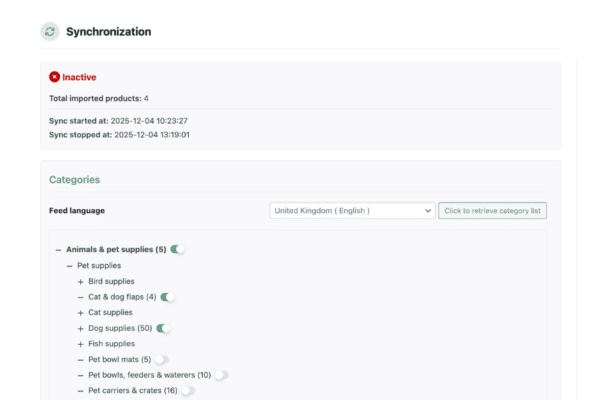
Within the settings of the Van der Meer WooCommerce plugin you can select which product categories you would like to be imported. Based on the selected categories, we will import all the products within that particular category.
Van der Meer supports Netherlands, Belgium and Germany. However, the XML feed URL of the product import is bound to language, due to product information. Therefore we ask you to choose the country where you are going to sell before you start importing the products.
Yes, based on the settings within the Van der Meer WooCommerce plugin.
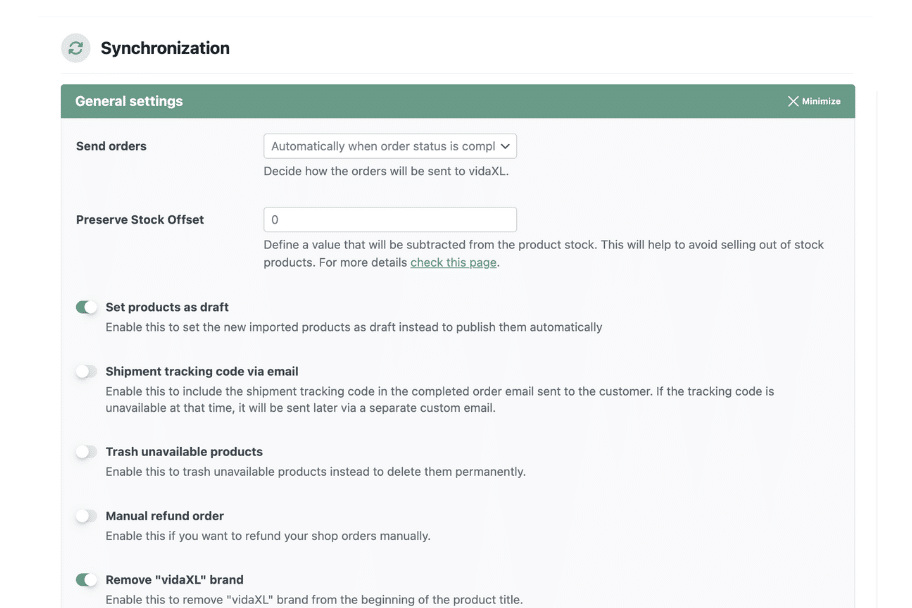
Based on the trigger you configure in the settings, an incoming WooCommerce order will be transferred automatically. You can also choose to do this manually, if you like.
Once Van der Meer ships the order you will receive the track & trace of the shipment. This way, you can inform your customer about the order’s status. The Track & Trace will be shown within the particular WooCommerce order as a Custom Field, with that you can add the field to an e-mail template and inform your customer.
Our Van der Meer WooCommerce plugin knows which products you have imported from Van der Meer to WooCommerce. We also see when Van der Meer does a change in the XML feed, for that particular product. The following product information is automatically updated:
Are you planning to change the product information such as title, description, images and category? Then you can enable the option – within the plugin settings – to not update that information automatically from the XML feed. To prevent that your changes will be overwritten.
"*" indicates required fields

Learn to build a store with WooCommerce
Host your WooCommerce store
Sync with European Dropshipping suppliers
Accept 30+ worldwide payment methods